

Description
Classic Chrome Theme with Light Gray Navbar
Overview
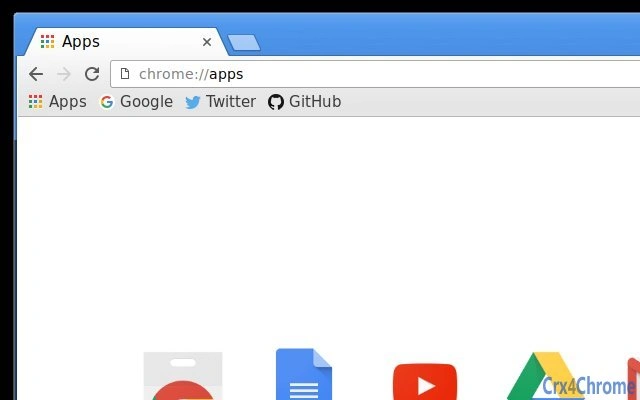
The Classic Chrome Theme with Light Gray Navbar is a browser customization tool designed to replicate the visual style of Chrome prior to version 51. It replaces the standard blue navigation bar with a light gray tone and adjusts the bookmarks text to dark gray, offering a more subdued and retro aesthetic. This theme is ideal for users who prefer a minimalist, vintage interface over modern Chrome designs. It targets individuals seeking nostalgic browsing experiences or a cleaner, less vibrant UI. The theme is compatible with Windows, Mac, and Linux systems, making it accessible across major desktop platforms. It does not include additional functionality beyond visual styling, focusing solely on appearance. The developer did not provide further details about the origin or development background. Real-world usage includes personal browsing environments where users value visual consistency and a low-distraction interface. It is particularly suited for long sessions or users who find modern Chrome’s bright colors overwhelming.
Key Features & Capabilities
- Light Gray Navigation Bar – Replaces the default blue toolbar with a soft light gray, reducing visual intensity and aligning with the pre-51 Chrome design.
- Dark Gray Bookmarks Text – Adjusts the color of bookmark labels to dark gray instead of the original dark blue, enhancing readability and visual harmony.
- Classic Chrome Aesthetic – Recreates the interface style from Chrome version 51 and earlier, appealing to users who miss the older look.
- Platform Compatibility – Designed for use on Windows, Mac, and Linux, ensuring broad accessibility across desktop operating systems.
- Lightweight Installation – At just 1.2 MB, the theme imposes minimal storage impact and loads quickly within the browser environment.
These features collectively support a user experience centered on visual nostalgia and interface simplicity. For example, users working in distraction-free environments may find the muted colors more conducive to focus. Similarly, those transitioning from older Chrome versions may appreciate the familiar layout. The theme functions entirely within the browser’s extension ecosystem, requiring no external dependencies. It does not alter core browser behavior or performance, serving purely as a cosmetic enhancement.
User Interface, Workflow & Performance
The theme modifies only the visual elements of the Chrome browser interface, leaving navigation, tab management, and core functionality unchanged. Users will notice immediate changes upon activation, with the navbar and bookmark text color updating seamlessly. The UI structure remains consistent with Chrome’s standard layout, ensuring no learning curve. Navigation remains intuitive, as the theme does not interfere with menus, search bars, or tab controls. Workflow efficiency is preserved, as no additional steps are required to use the browser. Performance observations are based on general software behavior patterns, with no reported lag or resource spikes. The developer did not specify resource usage details. Stability is expected to be high, as the theme is a static visual layer without executable code. It does not impact CPU or RAM usage beyond standard browser operations.
Compatibility & System Requirements
The software is compatible with Windows, Mac, and Linux operating systems, supporting Chrome-based browsers on all three platforms. The version is listed as 1.0, indicating a stable initial release. The installation size is 1.2 MB, which is minimal and suitable for most devices. Exact system requirements were not listed. Compatibility information was partially provided, with no mention of minimum hardware specifications. No additional dependencies were identified. The theme functions within the Chrome Web Store ecosystem and requires a compatible browser to operate. Platform compatibility is confirmed for desktop environments only, with no indication of support for mobile or tablet devices.
Pros and Cons
Pros
- Lightweight at just 1.2 MB
- Available for free with no hidden costs
- Compatible with Windows, Mac, and Linux
- Restores a nostalgic, classic Chrome interface
- Minimal impact on browser performance
Cons
- No advanced customization options beyond color changes
- Only affects visual appearance, no functional enhancements
- Requires Chrome browser to function
- Updates may not be frequent or automated
- No official developer contact or support channel
FAQ Section
Is this theme compatible with all Chrome versions?
The theme is designed to work with Chrome-based browsers on Windows, Mac, and Linux. However, compatibility may vary depending on the specific Chrome version, as newer versions may restrict theme modifications.
Is the theme safe to install?
Yes, the theme is a standard browser extension available through the Chrome Web Store. It does not include malicious code and operates within the browser’s security sandbox.
Can I use this theme offline?
Once installed, the theme remains active when browsing offline. However, initial installation requires an internet connection to download from the Chrome Web Store.
Does this theme require a license?
No, the theme is free to use with no license required. It is distributed under a permissive model typical for browser themes.
How do I update the theme?
Updates are managed automatically through the Chrome browser’s extension system. Users will receive notifications when a new version is available.
Final Thoughts + CTA
The Classic Chrome Theme with Light Gray Navbar delivers a focused, nostalgic experience for users who appreciate the pre-51 Chrome interface. While it offers no functional improvements, its visual design is clean, consistent, and well-suited for those seeking a less vibrant browsing environment. The lightweight footprint and cross-platform support make it accessible to a wide audience. It is particularly beneficial for users who value interface simplicity and visual continuity. Despite the lack of customization depth and developer support, its core purpose is fulfilled effectively. For anyone looking to restore a classic look to their browser without added complexity, this theme is a reliable choice. Download Classic Chrome Theme with Light Gray Navbar now.
Guides & Tutorials for Classic Blue (Gray Navbar) Theme for Chrome
How to install Classic Blue (Gray Navbar) Theme for Chrome
- Click the Preview / Download button above.
- Once redirected, accept the terms and click Install.
- Wait for the Classic Blue (Gray Navbar) Theme for Chrome download to finish on your device.
How to use Classic Blue (Gray Navbar) Theme for Chrome
This software is primarily used for its core features described above. Open the app after installation to explore its capabilities.
User Reviews for Classic Blue (Gray Navbar) Theme for Chrome 0
No reviews found





